Save browser passwords, WiFi keys, BitLocker recovery keys, email logins, FTP credentials and software license keys in one scan — before you format or move to a new PC.
Runs 100% offlineNo data transmittedLifetime licenseWindows 7 – 11
⭐ Most Popular
Digitally signedRead-only access8+ years maintainedNo background servicesFeatured in tech press
All-in-one solution
One scan. Every credential. Ready to restore.
When you reinstall Windows, your user profile is deleted along with every credential it contains. Browser logins, WiFi keys, software licenses, email credentials and FTP accounts — all gone unless you export them first.
Advanced Password Recovery Suite scans all credential storage locations in Windows in a single pass and exports everything to a portable backup file. No need to run five separate tools.
All processing stays on your computer — nothing is transmitted online at any point.
Software license keys
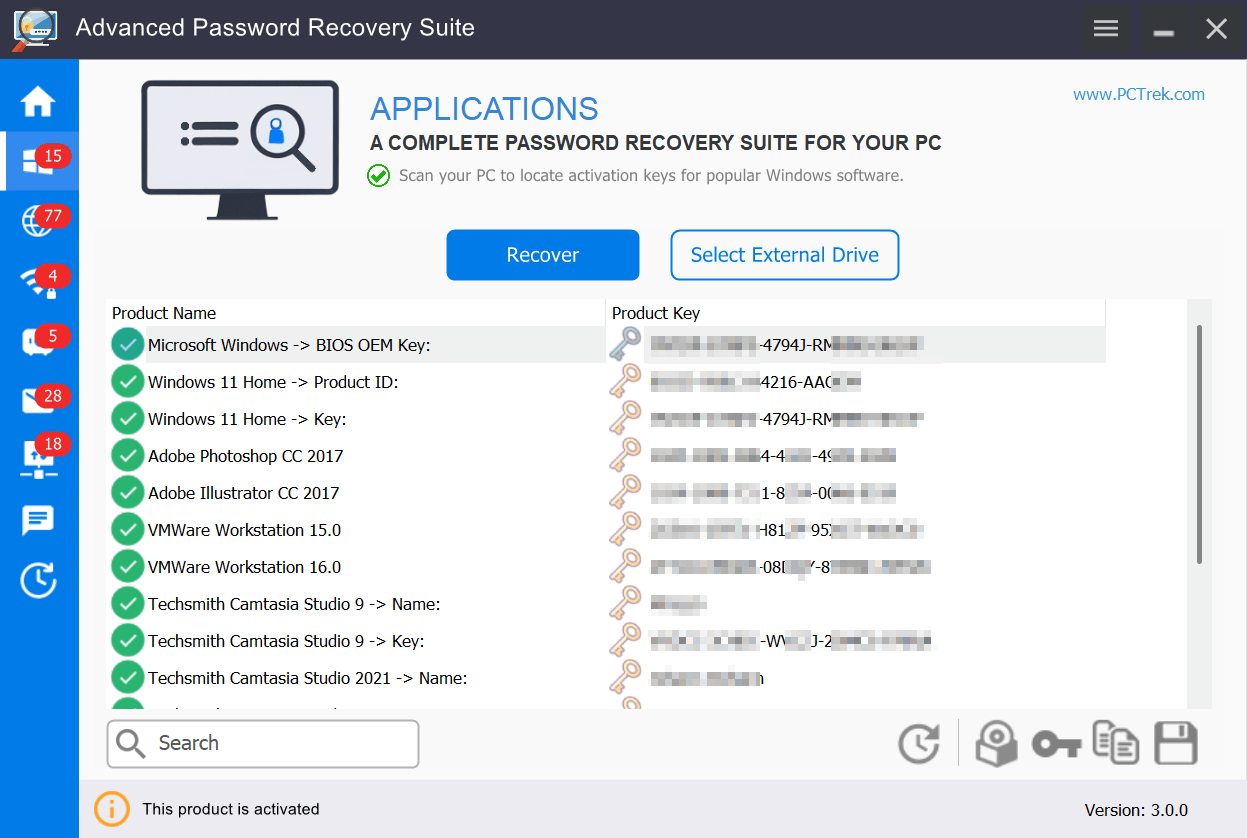
Windows, Office, Adobe, AutoCAD, WinZip and 10,000+ installed programs extracted from the registry.
Browser passwords
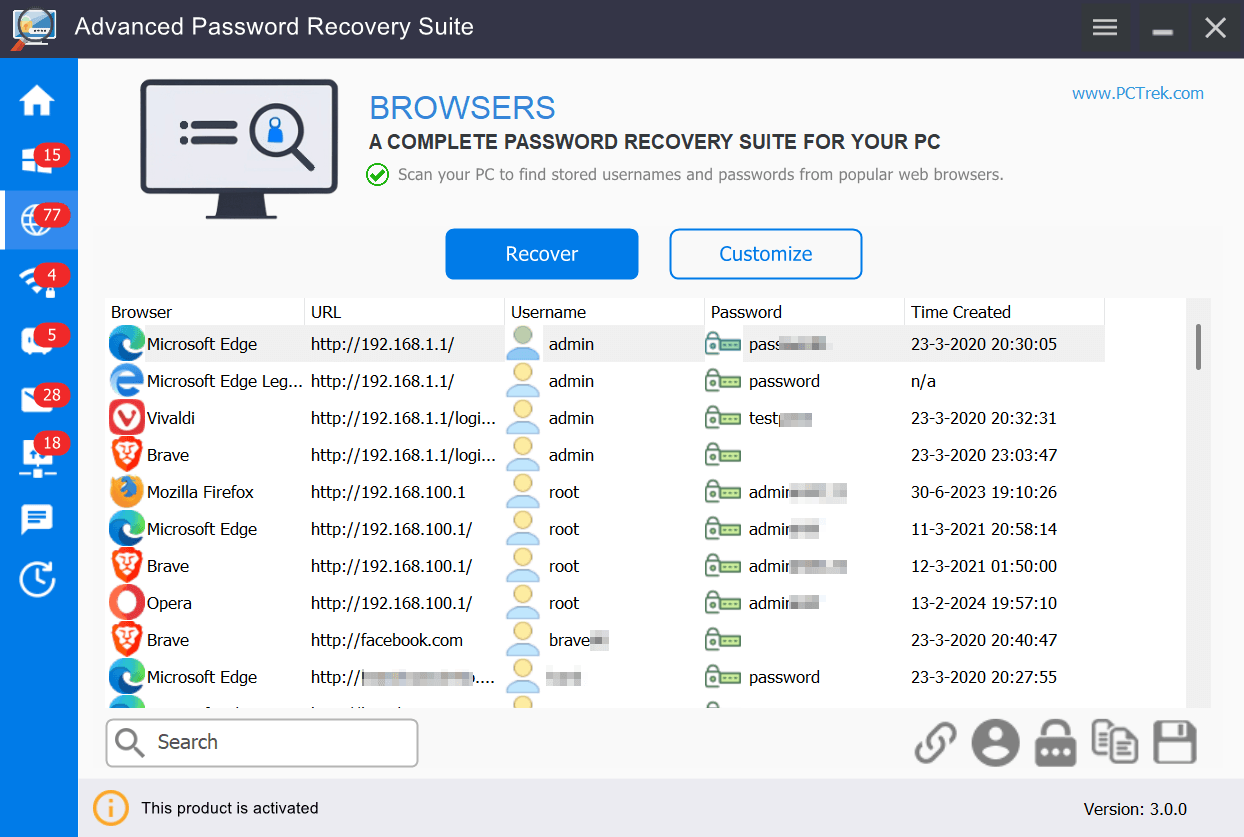
Chrome, Edge, Firefox, Opera, Brave, Vivaldi and 70+ Chromium browsers. Export to CSV, TXT or clipboard.
WiFi network keys
WPA2 and WPA3 passwords for every saved network. No router reset required — read directly from Windows.
Email credentials
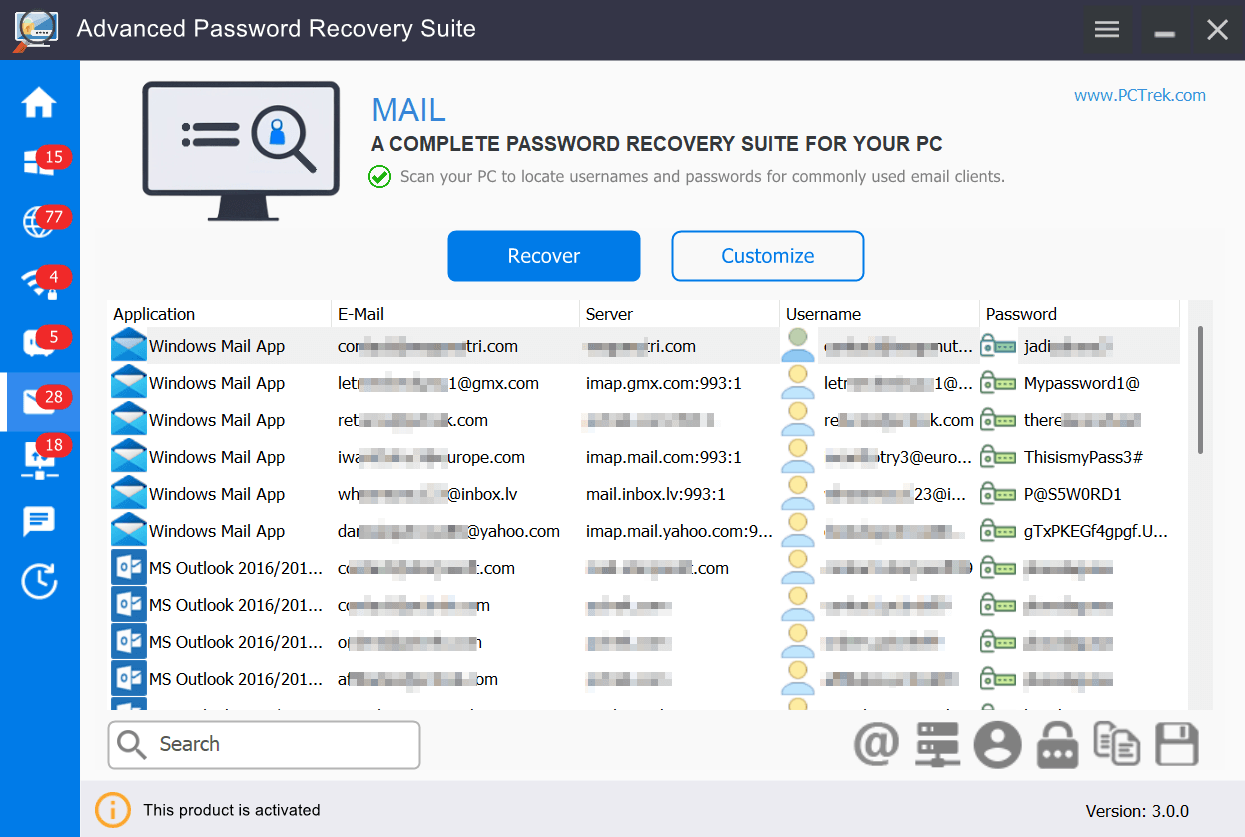
Outlook, Thunderbird, Windows Mail and other email clients that store account passwords locally.
FTP credentials
FileZilla site manager entries, WinSCP sessions, SmartFTP, CoreFTP and other saved server profiles.
Windows Credential Manager
RDP logins, network share passwords and stored Windows authentication entries.
NEW
BitLocker recovery keys
Finds locally stored recovery keys for BitLocker-protected drives and volumes that are currently unlocked. Keys stored only in a Microsoft account or Active Directory must be retrieved from there.
New in v4.0.0
BitLocker Recovery Key Finder
Advanced Password Recovery Suite can find locally stored BitLocker recovery keys for drives and volumes that are currently unlocked, reading the available recovery information directly from Windows.
Works on unlocked BitLocker-protected drives and volumes
Finds the recovery key when it's stored locally
Export the result alongside your other recovered credentials
Please note: this feature requires the recovery key to be stored locally. If it's stored only in a Microsoft account or Active Directory, Advanced Password Recovery Suite cannot retrieve it from the local machine — you'll need to retrieve it from the account or directory where it is stored.
Software license keys
Backup Windows, Office & software activation keys
Software license keys are stored in the Windows registry. A clean install wipes the entire registry — along with every activation code for Windows, Office, Adobe, games and any other locally licensed program. Save them first.
This is especially critical for software without an online account — older Office versions, Adobe products, professional tools and classic games where the registry key is the only reactivation path.
10,000+ programs supported — Windows, Microsoft Office, Adobe Creative Suite, AutoCAD, WinZip, VMware and more
Classic games included — Battlefield, Command & Conquer, Need for Speed and hundreds of older titles
Export to text or CSV — clear backup file listing every product name and its activation key
Also scans external drives — recover keys from an old or non-bootable drive connected to another PC
Passwords & credentials
Browser passwords, WiFi keys, email & FTP logins
Beyond software licenses, a Windows reinstall also wipes browser passwords, WiFi network keys, email account credentials, FTP server logins, and Windows Credential Manager entries — all in one format operation.
Advanced Password Recovery Suite recovers all of these in a single scan, so you never need to reset accounts manually after moving to a new PC.
Browser passwords — Chrome, Edge, Firefox, Opera, Brave, Vivaldi and 70+ Chromium variants, export to CSV or TXT
WiFi network keys — WPA2 and WPA3 passwords for every saved network, no router reset required
Windows Credential Manager — saved RDP logins, network share passwords and system authentication entries
Email client credentials — Outlook, Thunderbird and Windows Mail account logins and server settings
FTP server logins — FileZilla site manager entries, WinSCP sessions, SmartFTP and other saved server profiles
100% safe & local
Every step happens on your machine. No credentials are transmitted, uploaded or stored externally. The software has been digitally signed and continuously maintained for over 8 years.
Verified publisher certificate
No internet connection required
Read-only — never modifies files
No background services or drivers
Trusted by IT professionals worldwide
Featured in tech press worldwide
Simple process
From download to backup in minutes
No setup, no registration. Scan, review, export.
1
Download & install
Download the free trial and install on your Windows PC. No account needed. The trial scans your system and shows everything that can be recovered before you decide to purchase.
→
2
Select & scan
Choose what to recover — browser passwords, WiFi keys, software licenses, email logins, FTP credentials — or run a full scan across all categories at once. Takes seconds.
→
3
Export & save
View all recovered credentials in a clear table. Export to CSV or TXT, or copy specific items to clipboard. Done before your reinstall begins, safely stored on a USB drive.
Important: Run the scan before formatting. Once Windows is reinstalled, the encryption keys that protect your stored credentials are permanently deleted — recovery is not possible after the fact.
Screenshots
See it in action
Click any image to enlarge.
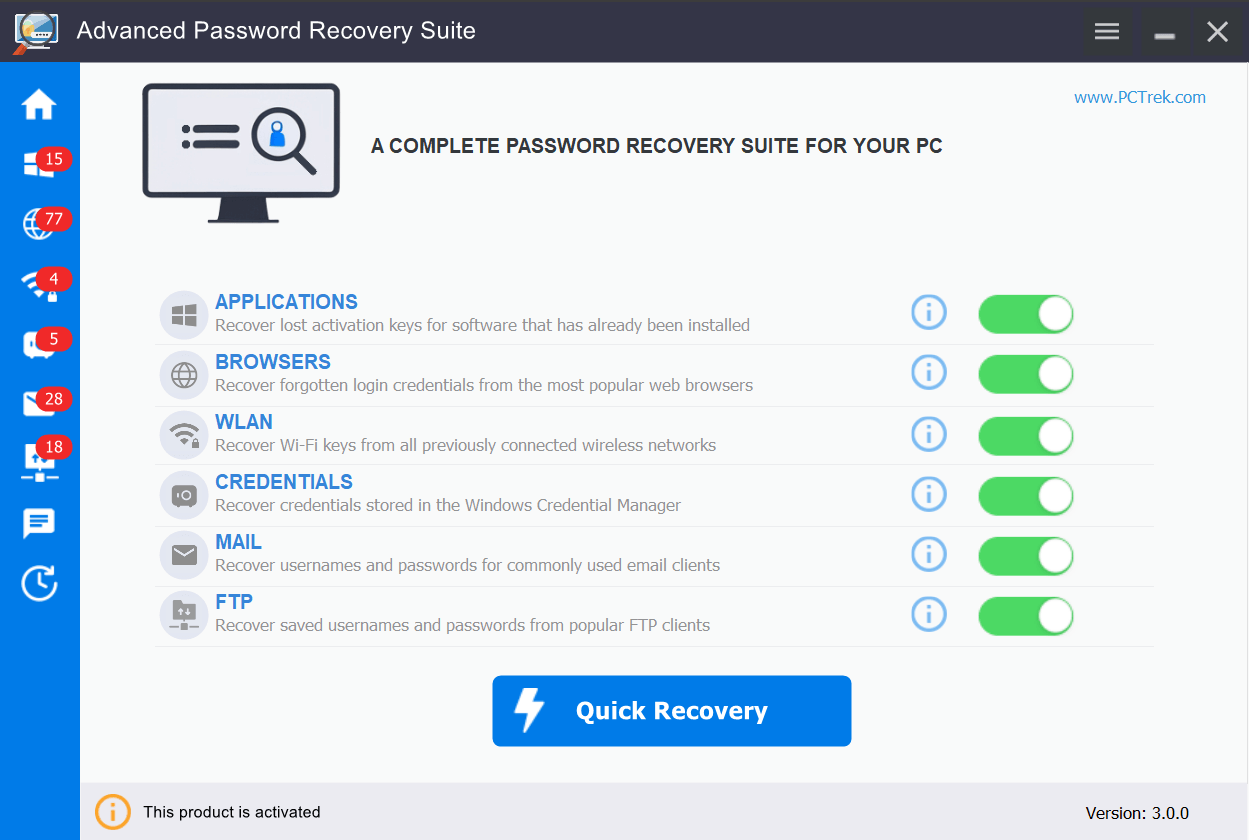
Main dashboard
License key recovery
Browser passwords
Email credentials
Pricing
Try free, upgrade when ready
The free trial shows all recoverable items with passwords partially masked. Upgrade to export the full results.
Free Trial
$0
No time limit
Full system scan
Shows exactly what you'd lose after formatting
Passwords masked — upgrade to export before it's too late
System requirements: Windows Vista · 7 · 8 · 8.1 · 10 · 11 · 256MB RAM · 20MB free space · 400MHz+ CPU
User reviews
★★★★★
4.8 out of 5
Based on 124 verified reviews
★★★★★
"Saved me from losing hundreds in software. Extracted my Office and Adobe keys in under a minute before formatting. Absolute lifesaver for anyone who reinstalls Windows."
MR
Michael R.
Verified buyer · Graphic Designer
★★★★★
"Got a new laptop and needed all my saved logins. Exported Chrome passwords and WiFi keys in one scan. Everything transferred seamlessly — didn't have to reset a single account."
SL
Sarah L.
Verified buyer · Freelancer
★★★★★
"We deploy this before every Windows upgrade in the office. The business license is great value. FTP and email credential recovery are a huge plus for IT work."
DK
David K.
Verified buyer · IT Administrator
FAQ
Frequently asked questions
Install the software, select "Browsers" from the main menu, click Recover, and view all recovered passwords in the results table. Export to CSV or TXT in one click. Works with Chrome, Firefox, Edge, Opera, Brave, Vivaldi and 70+ Chromium-based browsers. The scan completes in under a minute.
Yes. The software reads WPA, WPA2 and WPA3 keys stored in your Windows wireless network history — no router access or reset needed. Every previously connected network and its password is listed.
Yes. After a clean Windows install the system encryption keys change permanently. Browsers, WiFi networks and email clients can no longer decrypt previously stored credentials. You must export them before formatting — there is no recovery path after the fact.
Select "Mail" from the recovery menu and click Recover. The software scans for stored credentials across Microsoft Outlook, Windows Mail, Thunderbird, Opera Mail and other clients that save passwords locally.
Strongly recommended. Major in-place upgrades, disk replacements or profile corruption can all remove stored credentials. Running a backup before any significant system change takes two minutes and prevents potential permanent data loss.
Yes, completely. All processing happens locally on your computer — no passwords are transmitted anywhere. The software uses read-only access and never modifies system files. It is digitally signed with a verified publisher certificate and has been in continuous development for 8+ years.
Yes, as of version 4.0.0. The software finds and exports the BitLocker recovery key for any drive or volume that is currently unlocked, provided the key is stored locally. It cannot retrieve a recovery key that's stored only in a Microsoft account or Active Directory; in that case you'll need to retrieve it from there instead.
Download the free trial first — it scans your system and shows exactly what can be recovered before you pay anything. If the trial shows your data, the paid version will export it. If the trial finds nothing, don't buy. This way there's no risk.
Before formatting your PC, all saved credentials exist only in the current Windows user profile — encrypted with keys permanently deleted during a clean install. After formatting, there is no recovery path.
Advanced Password Recovery Suite performs a full credential scan across all storage locations and exports everything into readable backup files: browser passwords from Chrome, Edge and Firefox; WiFi network keys; Outlook and Thunderbird email credentials; FileZilla FTP logins; Windows Credential Manager entries; BitLocker recovery keys for unlocked drives and volumes; and software license keys. One scan, one export.
Transfer accounts to a new computer
When moving to a new PC, credentials stored on the old Windows installation are completely inaccessible — browsers, WiFi profiles, email clients and applications all store logins locally, not in the cloud. Export all credentials to a portable backup, copy to USB, and restore access immediately after setup on the new machine — no manual resets required for any account.